
After so many years, there still is no solution to this problem online. So, I had to try to fix it on my own.
Update: This also fixes the 00000000-0000-0000-0000-000000000000 error!
Update, August 2026: error BLZBNTBTS00000028 is a different problem – and here is its real cause
If your installer does not hang at 45% but stops with BLZBNTBTS00000028 (“can’t connect to the patch service”), everything further down this page will waste your time. That error has nothing to do with left-over Blizzard files. I chased it on two of my own computers until I could measure the cause.
The part that makes no sense at first: your browser works perfectly. You can open battle.net, watch videos, download anything – and the installer still says it cannot connect. That is exactly why this gets misdiagnosed as “your Internet is broken”.
Test it yourself in 5 seconds
Open a Command Prompt and run these two lines. They use Windows’ own curl.exe, which checks certificates through the same Windows component the Blizzard installer uses, so it reproduces the installer’s behaviour exactly. Do not use the curl that comes with Git Bash: it brings its own certificate code and will happily report success while the installer keeps failing.
curl.exe -s -o NUL -w "ON =%{http_code}\n" https://us.version.battle.net/bts/versions
curl.exe -s -o NUL -w "OFF=%{http_code}\n" --ssl-no-revoke https://us.version.battle.net/bts/versions
Get ON =000 and OFF=200? Then this is your problem, and you now know it in five seconds instead of five hours. The only difference between the two lines is that the second one switches off the certificate revocation check.
What is actually happening
Let’s Encrypt and Google Trust Services have finished retiring OCSP – the small online question Windows used to ask, “is this certificate still valid?”. The certificate Blizzard’s patch server uses today offers no OCSP at all any more. The only method Windows has left is to download a whole certificate revocation list, about 161 KB, over plain HTTP on port 80, before it will trust the server.
When that download is refused, Windows aborts the connection itself with CRYPT_E_REVOCATION_OFFLINE (0x80092013), and the Blizzard bootstrapper reports it to you as BLZBNTBTS00000028. You can see it in the installer’s own log: the very first request fails in under 200 milliseconds – far too fast to be a real network timeout.
And here is what hides it: the blocked program is not a Blizzard program. That download is made by Windows itself, by lsass.exe, its TLS engine. So no Blizzard entry ever appears in your firewall log or asks you for permission, and whitelisting Battle.net-Setup.exe, Battle.net.exe or Agent.exe changes nothing. Your browser is unaffected because browsers carry their own revocation data and never depend on this download at all.
The fix
In your firewall, add one exception:
C:\Windows\System32\lsass.exe OUTGOING, TCP port 80 only
Leave every other port closed, and leave all incoming traffic closed. That is the whole fix. If you would rather not touch lsass.exe at all, set the firewall to “Allow outgoing” for the few minutes the install takes, then put it back.
Things I tried that do not work, so that you do not have to: whitelisting svchost.exe (I measured this one – it really does not help), whitelisting any Blizzard file, and installing the revocation list by hand in advance.
This mainly hits people running a whitelist-style firewall – TinyWall, simplewall, Comodo, GlassWire – where anything not explicitly allowed is blocked.
One warning when you check whether the fix worked: do not test only battle.net. Once Windows has downloaded that list it caches it, so battle.net starts answering 200 while every other site is still broken. Test something whose list cannot already be cached – https://letsencrypt.org and https://www.google.com are good. All three must answer 200. This cost me an entire evening.
Bonus: “Battle.net tells me my version is wrong, every month”
Same illness, different symptom. A Battle.net client that can never finish this check can never update itself either. It falls further and further behind, and a client too far behind reports a version mismatch. The moment I opened the firewall, mine updated on its own from 2.52.5.17620 to 2.52.9.17709.
The rest of this page is the original article, about the installer that hangs at 45%.
Two things worked for me:
1. Manually delete all stuff related to BattleNet from my computer (registry and disk) then try to reinstall:
Full of wisdom, Blizzard spreads its crap all over the computer:
- Manual clean up
- c:\ProgramData\Battle.net\
- c:\ProgramData\Battle.net_components\
- c:\ProgramData\Blizzard Entertainment\
- c:\Users\All Users\Battle.net\
- c:\Users\%UserName%\AppData\Local\Blizzard Entertainment\
- c:\Users\%UserName%\Documents\StarCraft II\
- c:\Program Files (x86)\Battle.net\
To delete the registry use this REG file (save the text below in a .reg file and run it OR go there and delete the keys manually)
Windows Registry Editor Version 5.00
[-HKEY_LOCAL_MACHINE\SOFTWARE\WOW6432Node\Blizzard Entertainment]

[-HKEY_CURRENT_USER\Software\Blizzard Entertainment]
Make sure no Blizzard process is still running OR restart Windows to terminate all Blizzard processes.
Turn off the firewall and start the installer.
2. Actually this is easier but it doesn’t always work: when the installer is stuck, look for a process called Agent.exe. Kill it. The installer might continue immediately. I figured this out, by looking into the log files.

3. In case the installation is corrupted, try this “DOS” commands (as admin):
    net stop winmgmt
    winmgmt /resetrepository
    net start winmgmt
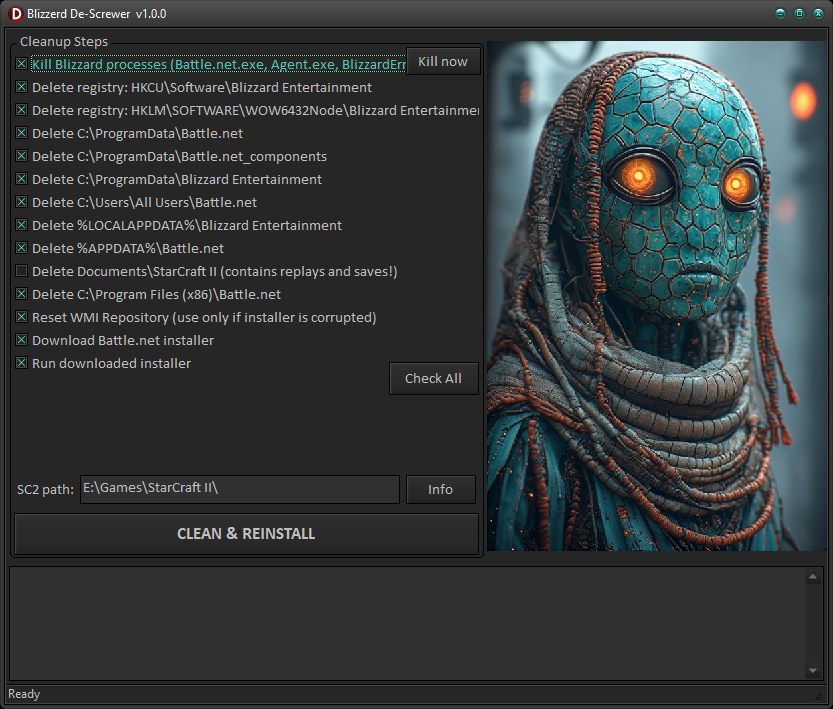
4. Blizzard DeScrewer
I created this program that will help you reset the BattleNet installation. Basically you could say it is an over-glorified uninstaller.
It does the whole checklist above for you, each step being an optional checkbox. Here is everything it can do:
- Kill Blizzard processes – Battle.net.exe, Agent.exe, BlizzardError.exe and the setup/update agent, so their files can be removed.
- Delete the registry keys – the HKCU and HKLM Blizzard Entertainment trees (recursive).
- Delete the left-over folders – the Battle.net and Blizzard folders in ProgramData, your AppData, and Program Files. Everything goes to the Recycle Bin, not a hard delete.
- Clean the Windows hosts file – removes stale Blizzard / Battle.net entries (a backup is saved first).
- Reset the WMI repository – the Update Agent needs WMI; this salvages/rebuilds it (and force-stops TinyWall, which blocks it).
- Enable the Secondary Logon service – Battle.net explicitly requires it.
- Reset the network stack – flush DNS + Winsock + TCP/IP reset (needs a reboot).
- Repair Windows system files – DISM + SFC (slow, but fixes a corrupted Windows).
- Force the launcher to English – for when Battle.net is stuck in the wrong language.
- Diagnose the certificate / revocation problem – runs the 5-second test above for you and says in plain words whether this is your problem. Read-only; it changes nothing.
- Repair the certificate revocation check – clears the cached failure, resets a broken WinHTTP proxy, re-syncs the clock, and when none of that is enough it tells you exactly which firewall exception to add.
- Download & run a fresh installer – the current version, straight from Blizzard.
The safe steps are pre-checked; the aggressive ones (hosts file, network reset, SFC/DISM) are off by default – tick them only if the basic cleanup wasn’t enough. Your StarCraft II replays and saves are left alone by default (Battle.net doesn’t use the registry to find games – after reinstalling, use Battle.net > StarCraft II > Locate the game).
The Blizzard Installer will give the impression that will get stuck again at some percentage (maybe even 45%). It isn’t. Give it a bit more time. Leave it open and do something else. Also make sure the installer has access to the Internet.
Disclaimer: The program is provided “as is”.