
I have this weird bug in Delphi 13 FMX where the height of the controls is not correct, at app startup.
procedure TForm1.AfterConstruction;
begin
  inherited AfterConstruction;
  MakeDemoBubble;
end;
TAutosizeBoxText (based on TRectangle) is parented in a ScrollBox. It is set to Align=Top.
procedure TForm1.MakeDemoBubble;
begin
  mmoUserResponse.Text :=
      'WhatsApp-like text bubble. ' + #13#10+
      'Cool and green!' + #13#10+
      'And fresh';

  //mmoUserResponse.Text:= IntToStr(Round(width)); // This magically fixes the problem
  btnSendAnswerClick(Self);
end;
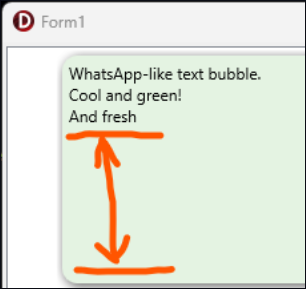
The UpdateSize method itself is not the problem since it works correctly later, AFTER the form was fully initialized:
procedure TAutosizeBoxText.UpdateSize;
VAR LMinHeight: Single;
begin
  if Width <= 0 then Exit;

  LMinHeight:= FTextLabel.Height + Self.Padding.Top + Self.Padding.Bottom + CTextHeightBuffer;

  Self.Height := Ceil(LMinHeight);
end;
Bug manifestation
If I call MakeDemoBubble at program startup, the "bubble" does not have the correct height (the height is 3x larger than it should be). However, if I create it LATER when the user clicks a button, the bubble has the correct height!
Looks like Width/Height of the form or of ScrollBox is not properly set yet.
What will fix it
- Creating the bubble later from a Timer (100ms).
- Creating the bubble later, OnButtonClick (user button click).
- "Broken" bubbles snap to correct height if I manually resize the window.
What will not fix it
- Calling the MakeDemoBubble in any valid startup method/event handler: AfterConstruction/FormCreate/FormShow/FormActivate/etc
- Calling UpdateSize in a TThread.ForceQueue.
I think, the fixes above indicates that the problem is in FMX not in my code. Let me know if you encountered a similar problem. I am looking for a less dirty solution.