
Claude Token Vampire monitors your Claude Code token usage in real time. Anthropic doesn’t show you how much of your current 5-hour session quota you’ve consumed — Claude Token Vampire does.
Free. Open source. Runs offline. Uses zero tokens.
GitHub repository | Download (ZIP) | Vote on next feature

Why it exists
Anthropic’s usage page shows percentage bars: “Current session — Resets in X hours”, plus the weekly limits. No token counts, no breakdown, no cost, no per-project history. Just bars and countdowns.
The session bar is honest about the reset (the 5-hour session really does hard-reset at that timestamp). What it is not honest about is the ceiling: Anthropic never publishes the exact token cap, so 72% could mean you have 10 minutes or 2 hours of heavy use left. That is the gap Claude Token Vampire fills.
How Anthropic’s 5-hour window actually works
Your first message starts a 5-hour clock. Every subsequent message counts against the same session budget. When the clock hits 5 hours the entire counter hard-resets to zero — not gradually, all at once. Your next message after that starts a fresh 5-hour session.
Anthropic’s own support page confirms this: “Your plan’s included usage limit will reset every five hours once you reach it.” (source). The Claude Code statusline exposes a single rate_limits.five_hour.resets_at timestamp (statusline docs) — one reset moment per session, not continuous expiry.
Correction note (2026-04-24): an earlier version of this page described the quota as a true sliding window where individual tokens “drip off” after 5 hours. That was wrong. The window is session-based. The rest of the page has been updated accordingly.
What’s actually missing from Anthropic’s UI
The reset countdown is fine. What you cannot see on the usage page:
- How many tokens you’ve actually burned (only a percentage)
- When inside the 5-hour session they were burned (early big burst vs steady drip looks identical)
- What kind of tokens (cache reads are cheap; cache creation is expensive)
- Per-project split (one heavy project can eat a quiet day’s budget)
- Cache status (5-minute and 1-hour tiers — about to cost you a rebuild?)
- A hard dollar number for the session so far
- A pace projection (at the current burn rate, when do you hit the cap?)
- What your subscription is worth (the same use, priced at API list prices)
A percentage bar crushes all of that into one number.
What Claude Token Vampire shows instead
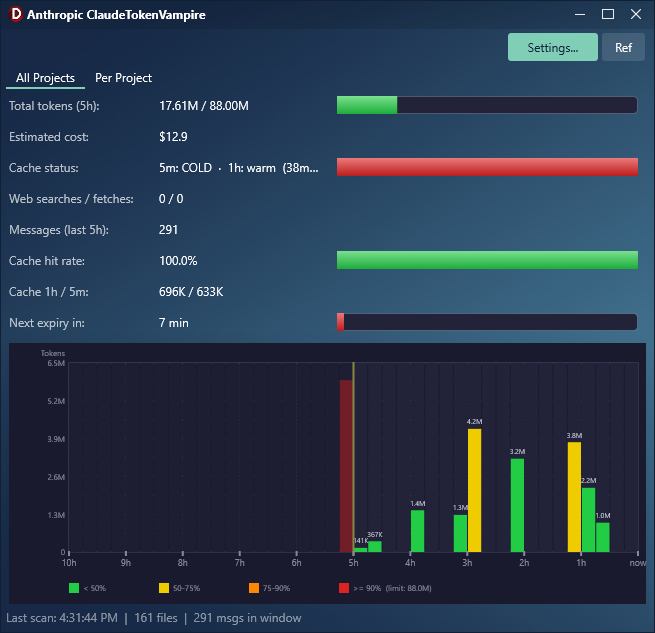
A per-15-minute bar chart spanning the full 5-hour session (start → +1h → +2h → +3h → +4h → end (reset)), with:
- Exact token counts by type (input, output, cache creation, cache read)
- A configurable ceiling so the bar chart’s colours actually mean something (green → yellow → orange → red)
- A real countdown to the session hard reset
- A cost estimate in USD, each reply priced at its own model’s published rate
- Cache warmth per tier (5-minute / 1-hour), with a warning before you pay for a full rebuild
- Per-project breakdown so you know which project is eating the budget
- 7-day tally alongside the session number, so the weekly cap doesn’t ambush you
- Pace projection — “at this rate you’ll hit the cap in 47 min” when usage is on track for an early lockout
- Top tool calls — which tools your sessions actually spend on, ranked over the last 7 days
- Recent sessions — read a past session and reopen it in its own terminal, for when a crash takes the windows but not the transcripts
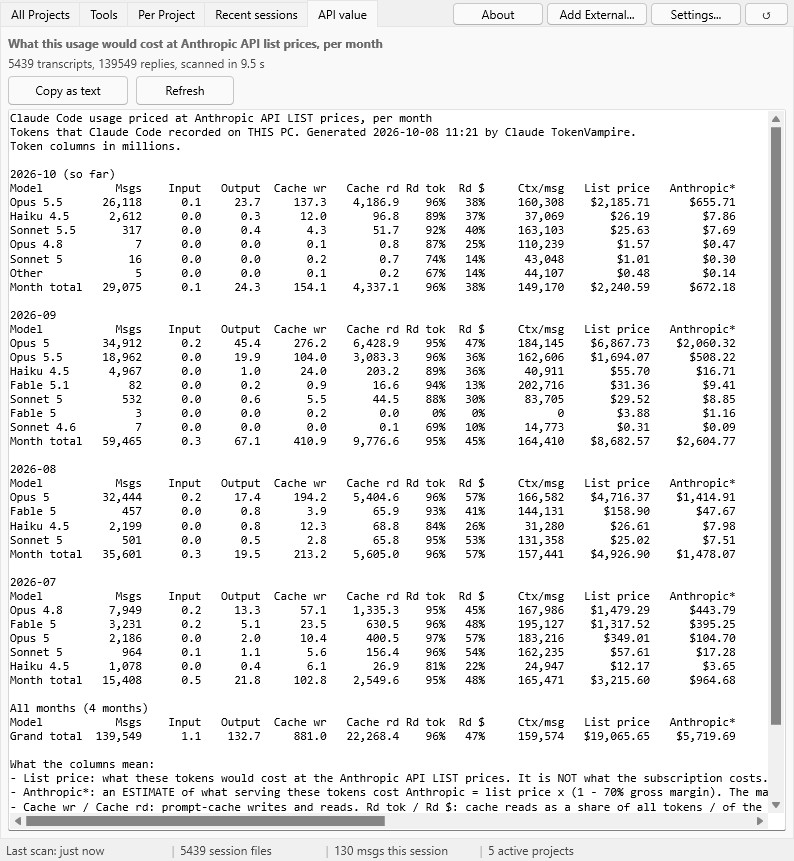
- API value – what your Claude Code use would cost at API list prices, month by month
Comparison
| claude.ai/settings/usage | Claude Token Vampire | |
|---|---|---|
| Token counts | Hidden behind a vague percentage | Exact numbers by type |
| Usage over time | Flattened into one bar | 5h bar chart, 15-minute buckets |
| Reset timer | Correct, but the ceiling it resets against is hidden | Same hard countdown, plus your configured ceiling so the percentage means something |
| Per-project split | None | Every project tracked separately |
| Cache status | Not shown | Hit rate + warm/cold warning per tier |
| Cost estimate | Not shown | Per-model published rates |
| 7-day cap | A percentage bar | Anthropic’s percentage plus this PC’s token count |
| Value of your plan | Not shown | Your use priced at API list prices, per month |
| Pace projection | None | “At this rate, cap in X min” |
| Chart span | None | Current 5-hour session (20 bars) |
| Works offline | Needs browser + login | Local files only. Zero tokens. Zero API calls. |
Anthropic tells you that you’re using tokens. Claude Token Vampire tells you how many, where, how fast, what kind, and how long until the session resets.
Related reading: The 5-hour mirage — Anthropic’s moving goalposts.
What it does
It puts you in control of your Claude Code tokens:
- Tracks all billable token types: input, output, cache creation, cache reads
- Shows the current 5-hour session with a per-bucket bar chart spanning
session_start → session_end - Tracks the 7-day cap alongside the session, with a configurable weekly limit
- Color-coded bars: green → yellow → red as you approach your limit
- Estimates cost per model — Opus, Sonnet, Haiku and Fable are each priced at their own rate, and a “Models used” row shows the mix. A single flat rate under-reported a mixed-model week by roughly half.
- Shows Anthropic’s own percentage, read from Claude Code’s statusline (Pro/Max plans only). Since version 1.2.0 it leads the 5-hour bar and the weekly row by default, because it counts your whole account (every PC, claude.ai); this PC’s own count is shown beside it. Settings > “Main bar shows” switches the bar back to this PC’s count.
- Counts each reply once. Claude Code writes one reply as several log lines; versions before 1.2.0 counted every line, so their token and cost totals were about 2.5x too high.
- Scans in the background with a disk cache, so the window never freezes, even with gigabytes of session logs. Session logs with a path longer than 260 characters are counted too.
- Shows cache hit rate and warns when the 5-minute cache gap expires
- Counts down until the session hard-resets (all tokens reset at once, not gradually)
- Projects pace: “at this rate, you’ll hit the cap in N minutes”
- Ranks your top tool calls over the last 7 days — calls, estimated cost, average duration
- Lists your recent sessions with their
/renamenames, lets you read one, and reopens it in its own terminal — written after a power failure killed eleven open sessions at once - Restores several sessions at once: tick them, click “Restore selected”, confirm once, and they reopen one after another
- Shows the messages and cost of each session, subagents included, and draws a line between sessions more than an hour apart, so the batch one crash killed stands out
- Shows the cost of each prompt in the transcript of a session, so you see which prompt burned the tokens
- Prices your whole history at API list prices, per month and model, and estimates what the same work cost Anthropic itself. One click copies the report as text for a forum post
- Lets you add manual entries for token usage from other machines or the claude.ai web interface (helps when one quota covers multiple devices)
- Runs quietly in the system tray — click the icon to show/hide. Choose between a solid status square or a 5-hour sparkline icon.
- USES 0 TOKENS by default — runs entirely offline, no API calls, no Claude queries. The optional auto-ping is opt-in and costs real tokens: each ping runs
claude -pon Haiku with your hooks switched off, but it still loads your CLAUDE.md files (about 44,000 tokens per ping, billed at the Haiku rate). Hooks forced by an administrator policy still run.
Views
- All Projects — combined current-session view across everything
- Tools — your top tool calls over the last 7 days
- Per Project — same chart broken down by project
- Recent sessions — read and reopen the Claude Code sessions a crash killed
- API value – your use priced at API list prices, per month and model
User manual
All Projects tab — Stats panel
| Label | Meaning |
|---|---|
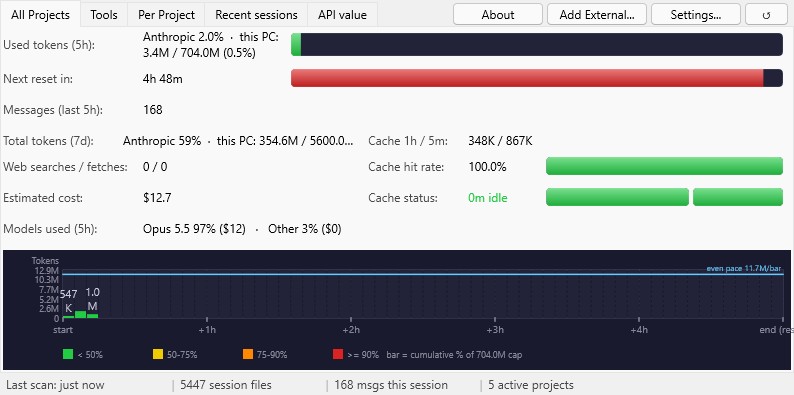
| Total tokens (session) | Input + output + cache creation + 10% of cache read in the current 5-hour session (the 10% is an estimate: Anthropic does not publish how cache reads count against the quota). With a fresh statusline reading, Anthropic’s own percentage leads the line and this PC’s count follows. Shown as used / limit. When the burn rate would hit the cap before the session ends, also shows (time) to cap at pace. |
| Total tokens (7d) | Tokens of the last 7 days. Since version 1.3.0, when a fresh statusline reading is available, the count starts at Anthropic’s own weekly reset instead, so it covers the same week Anthropic counts. Shown raw if no weekly cap is configured, or as used / cap (%) when you set MaxTokensWeekly in Settings. |
| Messages | Number of assistant responses in the current session. |
| Cache hit rate | cache_read / (cache_read + input). Higher = cheaper. 99%+ is normal for long sessions. |
| Estimated cost | USD estimate, each reply priced at its own model’s published rate (Fable, Opus, Sonnet, Haiku, including Fable 5.1, Opus 5.5 and Sonnet 5.5). The rates in Settings are used only for models the app does not know yet. |
| Reset in | Minutes until the current session hard-resets. When it hits zero, the entire counter returns to zero — all at once, not per-message. |
| Cache status | Two cache tiers. 5m cache (subagents/tools) — warm if last message < 5 min ago. 1h cache (main conversation) — warm if last message < 1 hour ago. Orange = 5m cold, 1h still warm. Red = both cold (full rebuild on next message). |
| Cache 1h / 5m | Breakdown of cache creation tokens by tier: 1-hour ephemeral vs 5-minute ephemeral. Display only — already included in the total. |
All Projects tab — Chart
Each bar = one 15-minute bucket (configurable 2–60 minutes per bar). The full 5-hour session has 20 bars at the default width, left edge at session_start, right edge at session_end (reset).
Y-axis is at least your per-bar budget (limit divided by the number of bars). With the default limit of 176M and 20 bars, that is 8.8M per bar. It grows when a bar is taller, and never drops below the Y-axis minimum set in Settings, so the scale stays sensible.
Bar colors (when a limit is set) show how much of the session limit was spent up to and including that bar:
- Green: < 50% of the limit
- Yellow: 50–75%
- Orange: 75–90%
- Red: ≥ 90%
Bar colors (no limit set): blue (auto-scale mode). A value label above each bar shows the token count for that interval. The labels are large, a label too wide for a narrow bar goes on two lines (830 / K), and a label that would overlap its neighbour is hidden.
Per Project tab
- Project list: active projects (with token counts) and inactive known projects (gray, separated)
- Per-project stats: tokens, messages, cache hit rate, cost, reset-in, cache status
- Per-project bar chart (same renderer, filtered data)
- Selection preserved across automatic refreshes
Tools tab
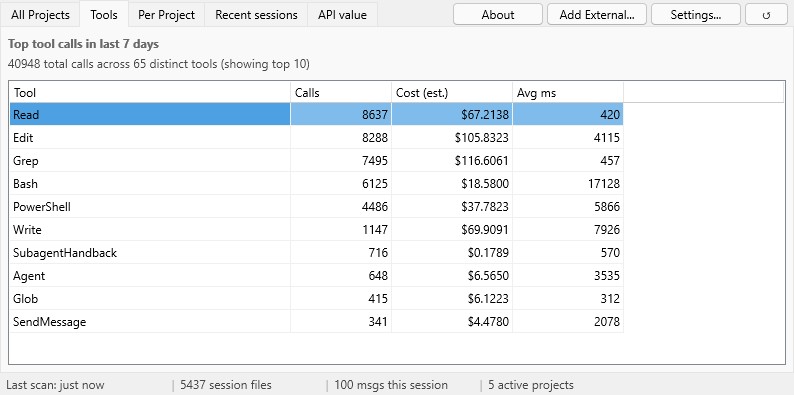
The 10 tools your sessions called most in the last 7 days, with three columns: Calls, Cost (est.) and Avg ms. The cost is an estimate: the output tokens of each reply are split evenly between the tool calls of that reply, priced at that reply’s own model rate. The tab scans only when you open it.
Recent sessions tab
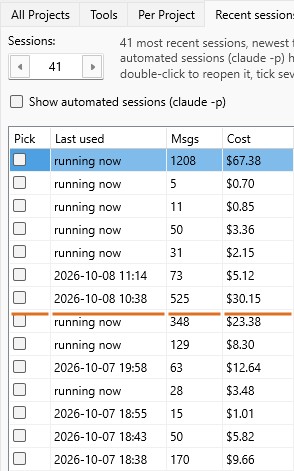
- Your latest Claude Code sessions, newest first, so everything one crash killed shows up as a tight band at the top. Choose how many to list (5 to 200).
- Read a session: click a row and its conversation appears below the list, without the tool traffic.
- Reopen a session: double-click a row (or click “Reopen session”) and it comes back in its own terminal, in its original folder, through
claude --resume. - The Name column shows the name you gave a session with
/rename. Hover a row for the full folder path. - A session that is still open is marked
running now; reopening it asks you first. - Headless runs (
claude -p, Agent SDK) are hidden unless you tick “Show automated sessions (claude -p)”. - Tick the Pick boxes and click “Restore selected” to reopen several sessions in one go, 2 seconds apart, after one confirmation. Sessions still running, and sessions whose folder is gone, are skipped.
- Msgs and Cost columns for each session, subagents included (a dash means the session has no messages in the last 8 days), and an orange line between two sessions more than an hour apart.
- Click a session to read its transcript. Each of your prompts shows what it cost and how many replies it took, for example
YOU - $0.42, 12 replies: the replies (subagents included) between that prompt and your next one, each priced at its own model’s rate. Like the Cost column, this covers sessions with messages in the last 8 days.
API value tab
What your Claude Code use on this PC would have cost at Anthropic’s API list prices. A good way to see what your subscription is worth. One row per month and model, with:
- messages and tokens (input, output, cache write, cache read)
- the cost at list price, and how much of it is cache reads
- the average context re-read per message (cache-read tokens per message)
- an estimate of what the same work cost Anthropic: the list price × 0.30, based on the “over 70%” inference gross margin that SemiAnalysis estimated (an analyst estimate, not an audited number)
The report covers your whole history, so the first scan can take a few seconds. Copy as text puts it on the clipboard as a plain-text table, ready for a forum post. Manual entries are left out.
Manual entries
The Add External toolbar button lets you log token usage that didn’t come from Claude Code on this machine — for example, sessions from claude.ai, the Anthropic console, or another computer running on the same account. Manual entries fold into the session and 7-day totals exactly like real entries, so the limits stay accurate when one quota covers more than one device.
Settings
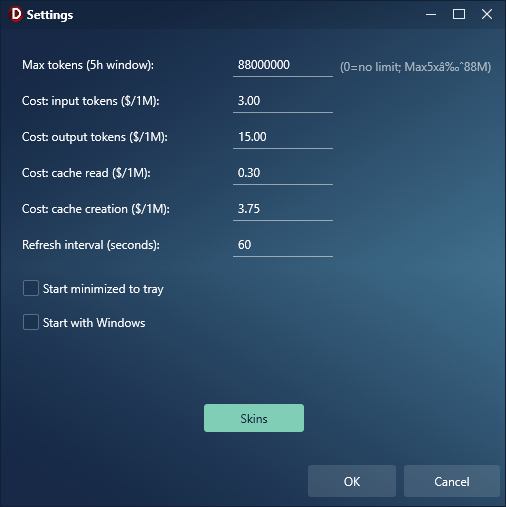
| Setting | Default | Notes |
|---|---|---|
| Main bar shows | Anthropic | Anthropic: Anthropic’s own percentage leads the 5-hour bar, the weekly row and the tray colour; this PC’s count is the breakdown. Local: this PC’s count leads. Without a fresh statusline reading the bar always shows this PC’s count, labelled “this PC only, estimated”. |
| Max tokens (5h window) | 176,000,000 | Your estimated session ceiling for this PC’s count. Anthropic does not publish exact caps; the plan presets are community estimates. When Anthropic’s percentage leads the bar, this number only scales the “this PC” breakdown. Set to 0 if unknown (chart switches to auto-scale blue). |
| Max tokens (7d window) | 0 (= unknown) | The 7-day rolling cap. Anthropic also doesn’t publish this number. Set to 0 to display raw weekly tokens, or enter your own estimate to get a percentage and color coding. |
| Cost: input tokens ($/1M) | 5.00 | Fallback price per 1M input tokens, used only for a model the app does not recognise (defaults: Opus 5). |
| Cost: output tokens ($/1M) | 25.00 | Fallback, per 1M output tokens. |
| Cost: cache read ($/1M) | 0.50 | Fallback, per 1M cache-read tokens. |
| Cost: cache creation ($/1M) | 6.25 | Fallback, per 1M cache-creation tokens. |
| Refresh interval (seconds) | 60 | How often to re-scan session files. Minimum 10. |
| Bucket width (minutes) | 15 | Width of each chart bar. Range 2–60. Smaller = more, narrower bars; larger = fewer, wider bars. |
| Y-axis minimum | 10,000,000 | Y-axis floor. Ratchets up as your usage grows so the scale stays useful; never shrinks back during a session. |
| Start minimized to tray | off | Hide window on app startup. |
| Launch at login | off | Launch at Windows login (Run registry key). |
| Minimize on close | on | If on, the X button hides the app to tray. If off, X exits the app instead. |
| Tray icon: sparkline | off | If off, tray icon is a solid color square (green/yellow/orange/red by usage). If on, the icon shows a tiny 5-hour sparkline of your bucket data. |
| Auto-ping Claude to start the 5h session window | off | Sends a short claude -p message on Haiku, with your hooks switched off, when no session is active or the current one has less than 30 minutes left, so a fresh 5-hour window is already running when you sit down. Costs real tokens: each ping still loads your CLAUDE.md files (about 44,000 tokens in one measured ping). |
| Auto-ping interval (minutes) | 60 | Minimum time between two pings. Range 30–240. |
Tips
- “CACHE COLD” warning: Two tiers. 5-min cache (subagents/tools): expires after 5 min idle — step away briefly and subagent calls get more expensive. 1-hour cache (main conversation): expires after 60 min idle — the full prompt rebuild only hits when you’ve been away for more than an hour. Orange = subagent cache cold, main cache still warm. Red = both cold.
- Reset-in countdown: When this hits 0, the whole session resets and your next message starts a new 5-hour window with full quota.
- Per-bucket chart: Helps spot usage spikes. A single tall bar suggests a big refactor or long conversation in that 15-minute window.
- Pace projection: When the rate of usage projects you’ll hit the cap before the session ends (and at least 10 minutes have passed for the rate to be meaningful), the tokens row shows
(time) to cap at pace. Otherwise it stays hidden — no fake “you’re fine” reassurance. - Cost estimate: Approximate. Real billing may differ. Useful for relative comparison.
Install
Download the ZIP from the GitHub repository and extract it.
- Copy the extracted folder somewhere permanent (e.g.
C:\Tools\ClaudeTokenVampire) - Double-click
Install.cmd - In Claude Code, run:
/reload-plugins
Launch (two ways):
- Fast: Type launch vampire, start vampire, or token monitor in Claude Code (instant, bypasses the model)
- Skill: Type
/claudetokenvampire:monitorin Claude Code (~5 sec, loads full context)
Requirements
- Windows 10/11
- Claude Code (no API keys needed)
- No external libraries needed
Platform support
| Platform | Status |
|---|---|
| Windows | Available now |
| macOS | Coming soon |
The codebase uses FMX (FireMonkey), which is cross-platform. The macOS port mainly requires swapping %USERPROFILE%\.claude\ for ~/.claude/.
Safety
- Opens files in read-only shared mode — never interferes with Claude Code
- Totally local
- No data is sent anywhere
- No tokens are spent (auto-ping is opt-in; when enabled, each ping costs tokens)
- No API key required
Vote on the next feature
Claude Token Vampire’s roadmap is shaped by what users actually need. Drop a vote (or a feature request) on GitHub Discussions. The most-requested items get prioritised. The app itself nudges you to vote once after your third launch and never asks again unless you want it to.
Roadmap
- Show window in “minimal” mode (only critical info)
- Beep when approaching maximum quota
- Budget enforcement via Claude Code hooks (warn or block before tools fire when you’re over budget)
- Real-time activity indicator — tray icon flashes when Claude is actively writing to the session file
- Session search — keyword search across all session files, with one-click resume
- Multi-computer support (live sync between two machines on the same account, beyond today’s manual-entry workaround)
- macOS port
Sources
- Anthropic Support: Manage extra usage for paid Claude plans
- Anthropic Support: Usage limit best practices
- Anthropic Support: What is the Max plan?
- Claude Code: Customize your status line — documents
rate_limits.five_hour.resets_atandused_percentage
Stars are free
If you find Claude Token Vampire useful, drop a star on GitHub. It encourages further development.
Written in Delphi 13 (FMX). Part of my wider collection of open-source Delphi libraries and tools.
If AI-assisted Delphi development interests you, see my book “Delphi in all its glory – AI-Assisted Development for Delphi”.