
Your AI assistant writes the code and compiles it. Then it stops, because it cannot click the OK button of your program.
Autopilot for Delphi lets the AI click it.
People keep asking me how an outside tool can push buttons inside a running EXE, so here is the whole trick in one picture.
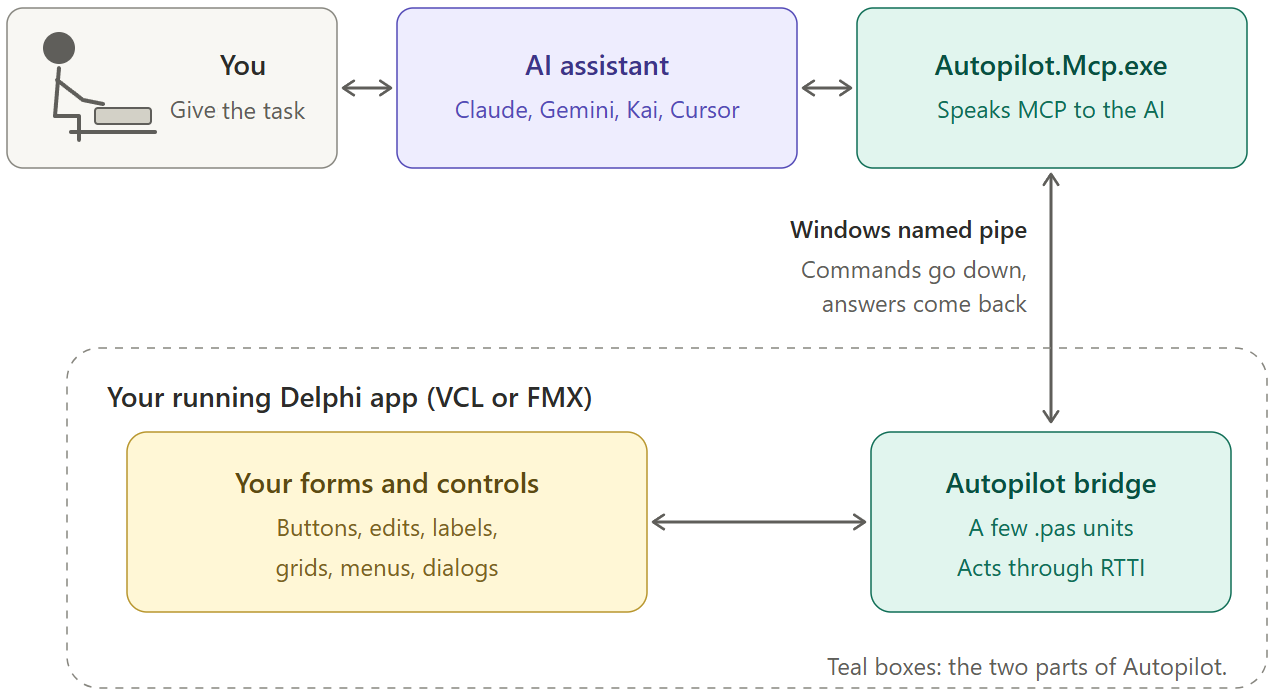
Three pieces
- The bridge. A few
.pasunits that you compile into your own app. Autopilot.Mcp.exe. A small server that speaks the Model Context Protocol (MCP), the language AI assistants use to call outside tools. Claude Code, Kai, Cursor and other assistants that speak MCP can use it.- A private Windows named pipe between the two.
The AI sends a command, for example “click btnSave“. Autopilot.Mcp.exe passes it down the pipe. The bridge runs it and sends the answer back up the same way.
The bridge is already inside
Autopilot does not break into your EXE from outside. You invite it in.
One line in your .dpr does it:
Application.CreateForm(TfrmMain, frmMain);
Autopilot.Bridge.Vcl.StartBridge;
Application.Run;
StartBridge starts a small worker thread in your app, and that thread opens the pipe.
When a command arrives, the bridge runs it on your app’s main thread, just as if your own code had called btnSave.Click.
So the AI drives the very instance you see on the screen: no restart, no second copy, no debugger attached.
You don’t even have to write that line yourself. Ask the AI to wire Autopilot into your project, and it adds the bridge units and the StartBridge call.
RTTI does the rest
How does the bridge know that your form has a button called btnSave?
Delphi already told it.
Every EXE carries RTTI for every published property, because the DFM loader needs it to load your forms.
The bridge reads that same RTTI through System.Rtti, so it sees the name, the class and the value of every control and property.
No extra RTTI, so your EXE does not grow because of it.
Because it works on the real objects, Autopilot needs no OCR and no screen coordinates.
It works with any third-party control pack too: DevExpress, TMS, anything.
And it never moves your mouse.
What the AI actually does
The AI first calls list_tree to see the controls of your form, with their names, classes and captions.
Then it acts on them: click, set_text, get_text, wait_for, screenshot, and a few more tools.
It never adds controls to your form. It only uses the ones you already put there.
A prompt as simple as this one is enough:
Run the Autopilot demo, click btnIncrement five times, then read lblIncrement and check the number.
And your Release build?
Clean.
The bridge works only when the AUTOPILOT define is set, which you put in your Debug build.
Without it, StartBridge compiles to nothing, so your users get no automation in their EXE.
Try it
The source code is on GitHub.
Installation, the demos and the full list of tools are on the Autopilot for Delphi page, and the technical details are on the details page.