
I open-sourced my AI client. For the moment it only supports Google Gemini, but it can be easily extended to other LLMs (Claude, OpenAI, etc.) by subclassing TLLMObject.
What it does
This Delphi library lets your application talk to the Gemini API without you having to fight with HTTP, multipart upload sessions, JSON body assembly, or response parsing. It handles all of that and gives you back a clean, structured result.
Library features:
- Cross-platform FMX — works on Windows, macOS, Linux, iOS, Android
- Tested with the latest version of Delphi
- Heavily tested in production
Code features:
- Send text prompts and get back structured JSON responses (enforced via a response schema)
- Upload local files (images, documents, text) and reference them in the prompt — uses Google’s resumable upload protocol
- Send multiple files to the AI in a single request
- Multi-turn chat support
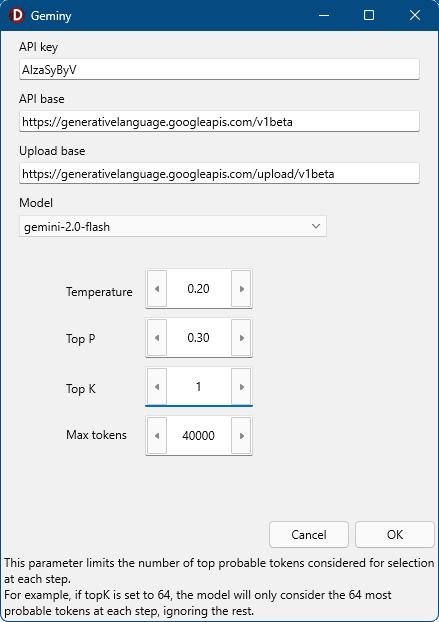
- Ready-made FMX settings dialog: API key, model, Temperature, TopP, TopK, MaxTokens, and the “thinking” toggle for Gemini 2.5+
- Settings and total token usage persisted between sessions (binary serialization to
AppDataFolder) - Built-in connection test, with meaningful error reporting (HTTP errors, safety blocks, token limits, etc.)
- Every AI response JSON is backed up to disk — handy for debugging and replay
- Safety parameters to reject inappropriate input
Class architecture
TAiClient                          Low-level HTTP, file upload, response parsing
  +-- TAiClientEx                  High-level SendAPICall, JSON body, multi-turn
        +-- LLM: TLLMObject        Abstract base for any LLM provider
                  +-- TLLMGemini   Gemini URLs, defaults, model list
Requirements
- The LightSaber framework — used for binary streams, app-data paths, file I/O, and logging
Installation
Open LightSaberAI.dpk in Delphi and click Compile.
If you want to know more about how to work with Delphi packages see my book.
Usage
The typical flow looks like this:
var
  Client: TAiClientEx;
  Response: TAIResponse;
  TextPart, SysInstr: TJSONObject;
begin
  Client:= TAiClientEx.Create;  // Auto-loads settings from disk
  try
    Client.UploadFiles(MyInputFiles);

    TextPart:= MakeTextPart('Analyze this image and return findings.');
    SysInstr:= TJSONPair.Create('system_instruction', ...);

    Response:= Client.SendAPICall(TextPart, MyInputFiles, SchemaFilePath, 'debug-name', SysInstr);
    try
      if Response.Valid
      then UseResult(Response.ExtractedJSONObj)
      else ShowError(Response.ErrorMsg);
    finally
      FreeAndNil(Response);
    end;
  finally
    FreeAndNil(TextPart);
    FreeAndNil(SysInstr);
    FreeAndNil(Client);  // Auto-saves settings
  end;
end;
Source code
The repository is here: GitHub.com/GabrielOnDelphi/Gemini-LLM-Client-for-Delphi
Licensed under the Mozilla Public License 2.0. Active — Gemini support is complete and in production use.
Pingback: Connecting Delphi 12 to Gemini AI (Smart CodeInsight) – Delphi, in all its glory